
Connecting CTEM data to AI agents over MCP: asking an AI about your own attack surface
Contents
"What's the most dangerous vulnerability we have right now?" "Which hosts appeared last week?" You can ask an AI in plain language instead of clicking through a dashboard.
The answers come from your own current attack surface data. What follows covers the mechanism, what it can do, and how the guardrails carry over.
Query your own attack surface in plain language, without navigating a UI
The key is MCP (Model Context Protocol), a common socket between AI applications and outside data. PentaTrail runs a remote server that speaks it.
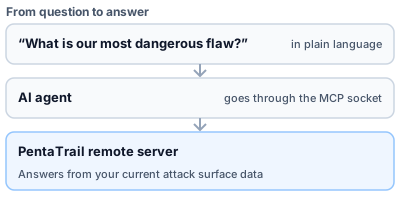
Figure 1: The path from question to answer
Deep dive: no integration code to write
Previously this meant reading an API spec, implementing authentication and writing code to parse responses. Registering one endpoint and pressing approve is what MCP replaces all of that with.
Connecting is one URL plus a browser approval
Register https://api.pentatrail.co/mcp as a remote server in your AI agent. When the connection starts, a browser opens so you can read what the connection permits before approving.
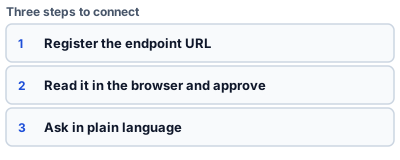
Figure 2: Register, approve, ask
Deep dive: each tool carries its own description
Which arguments a tool takes is defined by the list your client receives on connection — that list is the authority. Per-tool usage and the set of errors you can get back are collected in the MCP server guide.
Sixteen tools are available: ten that read, six that write
Ten read tools fetch lists, details and summaries; six write tools classify assets and operate on tasks. One more, for connecting, sits outside that set.
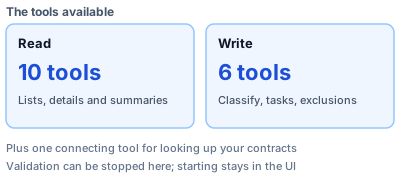
Figure 3: Ten reads and six writes, plus one for connecting
Deep dive: why the connecting tool is kept separate
ctem_list_my_contracts returns which contracts you belong to. It exists so that, when you belong to more than one, you can find the identifier to pass to the other tools. It neither reads nor writes CTEM data, so it lives outside the set of sixteen.
The same guardrails as ordinary use carry over unchanged
Going through an AI agent does not loosen anything. You see your own contract's data and nothing else, and row-level security is what holds that line.
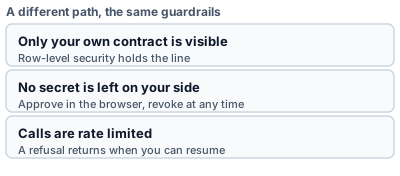
Figure 4: A different path, the same guardrails
Deep dive: approval can be revoked at any time
Because the connection is established by a browser approval, no credential has to be written into an external tool's configuration. Approval can be revoked from the admin screen, after which the revoked tool can read nothing. Since no secret was left on your side, revoking is itself the cut-off.
Where it pays: ad-hoc questions, situation summaries, report drafts
The gain shows up wherever the same shape of work repeats. A weekly report with near-identical structure leaves plenty of room to have the numbers fetched and a draft written.
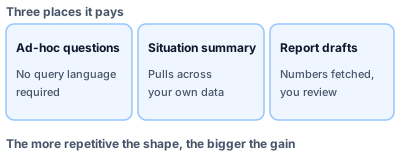
Figure 5: Three places it pays
- What is CTEM? How it differs from traditional vulnerability management
- What MCP changed: giving AI hands
- Threat Exposure Risk: technical risk multiplied by business risk
- MCP server guide
Having your attack surface answerable by an AI is free to try for 14 days.
Appendix: the tools, and how to start
Table 1: read tools (10)
| Tool | What comes back |
|---|---|
ctem_list_domains |
Monitored domains and their verification state; the place to start |
ctem_get_domain_overview |
Asset counts, open counts by threat level, recent change |
ctem_list_assets |
Asset list (hosts, IPs, URLs, ports, technologies, buckets and more) |
ctem_list_findings |
Findings, highest threat level first; open only by default |
ctem_get_finding |
One finding in detail, with detection history and linked validation runs |
ctem_get_prioritization |
Risk bands, affected hosts, owners, classification, attack-path chokepoints |
ctem_get_validation_state |
Whether validation is running, and why it stopped if not |
ctem_get_executive_summary |
Score trend and the weekly digest |
ctem_list_groups |
Groups, their members, and the contract's owners |
ctem_list_tasks |
What needs doing, and how far along it is |
Table 2: write tools (6)
| Tool | What it does |
|---|---|
ctem_classify_asset |
Add and remove classification tags, set the management category |
ctem_manage_domain |
Add a monitored domain, request ownership verification, remove one |
ctem_manage_group |
Create, change and delete groups, assign hosts, add and remove users |
ctem_manage_task |
Complete, reopen and change task state, set owner and deadline |
ctem_manage_validation |
Stopping validation only. Starting stays in the UI (host approval and consent to automatic runs happen there) |
ctem_manage_exclusions |
Exclude assets from monitoring, or bring them back |
The three steps to start
- Register
https://api.pentatrail.co/mcpwith your AI agent as a remote server. - When the tool starts connecting, a browser opens; read what the connection permits and approve it.
- Ask "what's the highest-priority vulnerability on our domain?"
The connecting tool ctem_list_my_contracts sits outside the sixteen above and exists to look up which contracts you belong to.
The tool count and split were checked against PentaTrail's implementation on 2026-08-17.
Visualize your attack surface with PentaTrail CTEM/ASM
From discovery to vulnerability validation and remediation — all powered by the CTEM framework.
Get Started